What Is Binary Code? How to Convert Text to Binary and Back
Binary code represents all digital information using just two states, 0 and 1, called bits; letters and numbers are stored as fixed patterns of eight bits (a byte) using a character code like ASCII, which is how text becomes something a computer can store and process.
By Mubasher Hussain · Published 2026-09-09 · Updated 2026-10-08 · 1220 words · about 5 minute read
Binary code is the language computers actually think in: every character you type, every pixel on this screen and every file on your disk is, at the lowest level, a pattern of ones and zeros. Converting text to binary makes that hidden layer visible, and it is far simpler than it looks once you know the two ideas behind it. This guide explains what binary is, how a letter becomes a byte, and how to convert text to binary and back reliably. You can follow along with the free Binary Code Translator, which runs entirely in your browser.
Why computers use binary
A computer is built from billions of tiny switches called transistors, and a switch has exactly two stable states: on or off. Binary, the base-2 number system, maps perfectly onto that reality, one digit for on, zero for off. Everything else is built on top. A single binary digit is called a bit, and eight bits grouped together make a byte. That grouping is not arbitrary: eight bits can represent 256 different values (2 to the power of 8), which was historically enough to cover every letter, digit and punctuation mark in English with room to spare.
So when people say a computer stores your text as ones and zeros, what they mean precisely is that each character is stored as a number, and that number is stored as a byte of eight bits. The job of a binary translator is simply to make that chain, character to number to bits, visible in both directions.
From a letter to a number: character codes
Before text can become binary, each character needs a number. That mapping is defined by a character set. The oldest and most fundamental is ASCII, which assigns the numbers 0 to 127 to English letters, digits, punctuation and a few control codes. In ASCII, capital A is 65, lowercase a is 97, the digit 0 is 48, and a space is 32. These are not random: the codes were arranged so that sorting by number sorts roughly alphabetically, and so that switching between upper and lower case flips a single bit.
You can see these numbers directly with the Text to ASCII tool. Once you have the number, the second step, turning it into binary, is pure arithmetic.
From a number to binary: reading a byte
Binary is a place-value system just like the decimal you use every day, except each place is worth twice the one to its right instead of ten times. In an 8-bit byte the places are worth, from left to right, 128, 64, 32, 16, 8, 4, 2 and 1. To read a byte, add up the place values wherever there is a 1.
Take the letter A, code 65. In binary that is 01000001. Reading the ones: there is a 1 in the 64 place and a 1 in the 1 place, and 64 plus 1 is 65. That is the whole trick. Lowercase a, code 97, is 01100001, which is 64 plus 32 plus 1. Notice that A and a differ by exactly one bit, the 32 place, which is the single bit that controls letter case in ASCII.
| Character | ASCII code | Binary (8-bit) |
|---|---|---|
| A | 65 | 01000001 |
| a | 97 | 01100001 |
| Z | 90 | 01011010 |
| 0 | 48 | 00110000 |
| space | 32 | 00100000 |
| ! | 33 | 00100001 |
Every printable character follows the same pattern. To convert a whole word, you convert each character in turn and write the bytes side by side, usually separated by a space so they are easy to read.
Converting text to binary, step by step
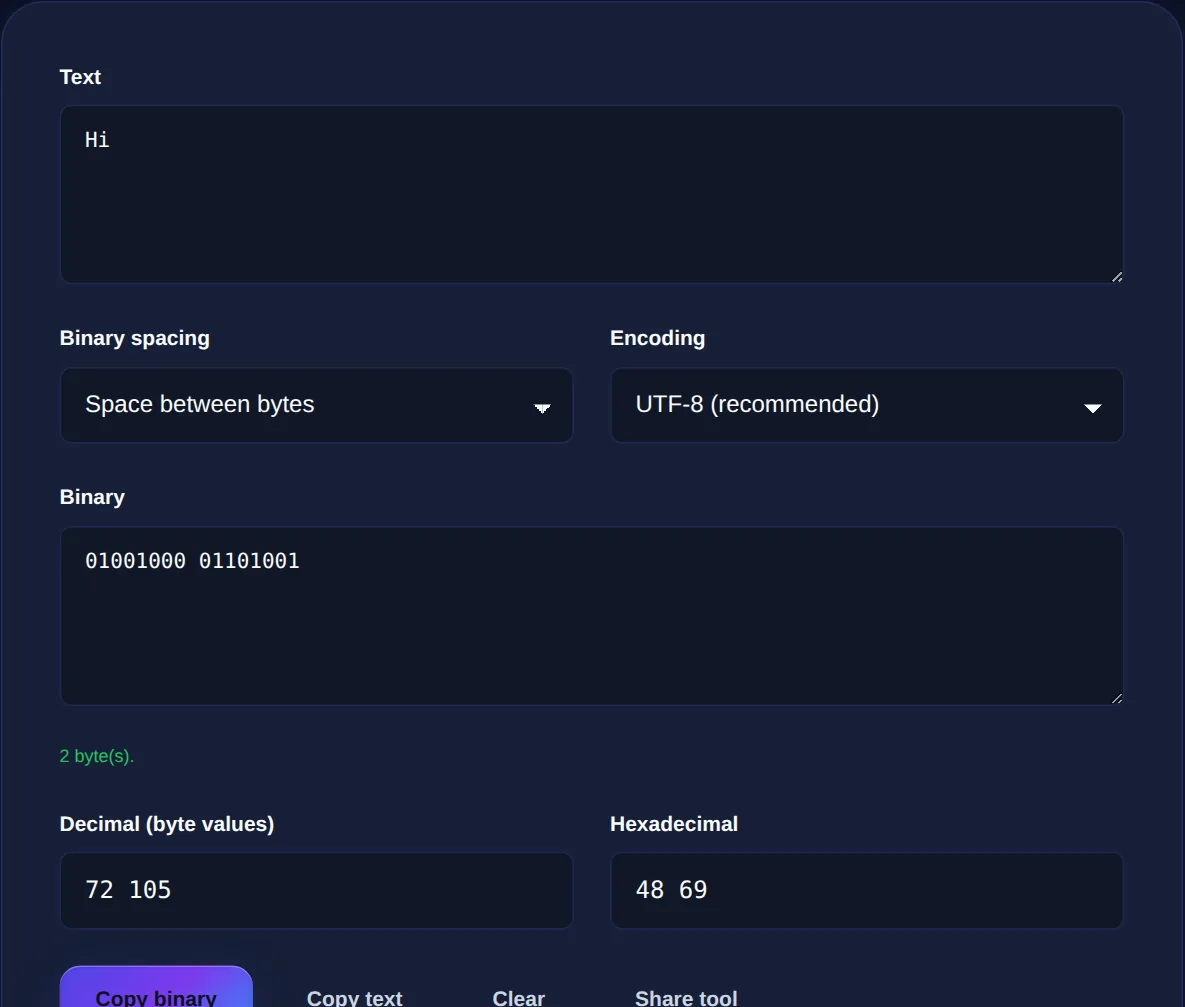
To convert the word Hi to binary by hand: H is code 72, which is 01001000; i is code 105, which is 01101001. So Hi becomes 01001000 01101001. That is exactly what the translator produces, and doing it once by hand is the fastest way to convince yourself the tool is not magic, just arithmetic done quickly.
Type text to see its binary instantly, or paste binary to decode it. Full UTF-8 support, plus decimal and hexadecimal output, all in your browser.
Converting binary back to text
Decoding is the same process in reverse, and the one rule that matters is grouping. Because each character is eight bits, you split the binary into groups of eight, read each group back to its number, and look the number up in the character set. That is why a valid binary string must have a length that is a multiple of eight: if it does not, a byte is incomplete and cannot be decoded. If a translator ever refuses your input, count the digits, a stray or missing bit is almost always the cause.
Beyond English: UTF-8, emoji and accents
Plain ASCII only reaches 127, which covers English but not accented letters, other alphabets, or emoji. The modern solution is Unicode, encoded as UTF-8. UTF-8 keeps the original ASCII codes unchanged for English, but represents everything else using two, three or four bytes. An accented e or a smiling emoji is therefore several bytes long in binary, not one. This is why a good binary translator defaults to UTF-8: it handles the full range of characters people actually type, and still behaves identically to ASCII for plain English.
If you convert a single emoji and get 32 bits (four bytes) rather than 8, nothing is broken, that is UTF-8 correctly using four bytes to encode a character outside the ASCII range.
Binary, decimal and hexadecimal
Binary is precise but long: one byte is eight digits, and a short sentence becomes a wall of ones and zeros. That is why programmers often view the same bytes in hexadecimal instead, where each byte is just two compact digits. Hex and binary line up perfectly because 16 is 2 to the power of 4, so one hex digit equals exactly four bits. The letter A, binary 01000001, is 41 in hex and 65 in decimal, three notations for one value. The translator shows all three at once so you can move between them, and the Number Base Converter lets you explore any base directly.
Common questions
Is binary the same as machine code? Not quite. Binary is the number system; machine code is the specific binary instructions a processor runs. Both are ones and zeros, but converting text to binary gives you the data representation, not runnable code. Why is a byte eight bits? Historically because eight bits was the smallest group that could hold one character plus a little headroom, and the size stuck. Can I convert binary to text on my phone? Yes, the translator is a web page that runs in any browser, and because it works entirely on your device your text is never uploaded.
Binary looks intimidating because it is long, not because it is complicated. Every character is a number, every number is a sum of powers of two, and every conversion is reversible. Keep the Binary Code Translator open while you experiment, and pair it with the Text to ASCII tool to see the character codes that sit in between.