JavaScript Minification: Smaller Bundles, Faster Load Times
How minifying JavaScript differs from minifying CSS, why it saves more, and how it fits with modern bundling.
By Mubasher Hussain · Published 2026-07-28 · Updated 2026-09-01 · 1064 words · about 5 minute read
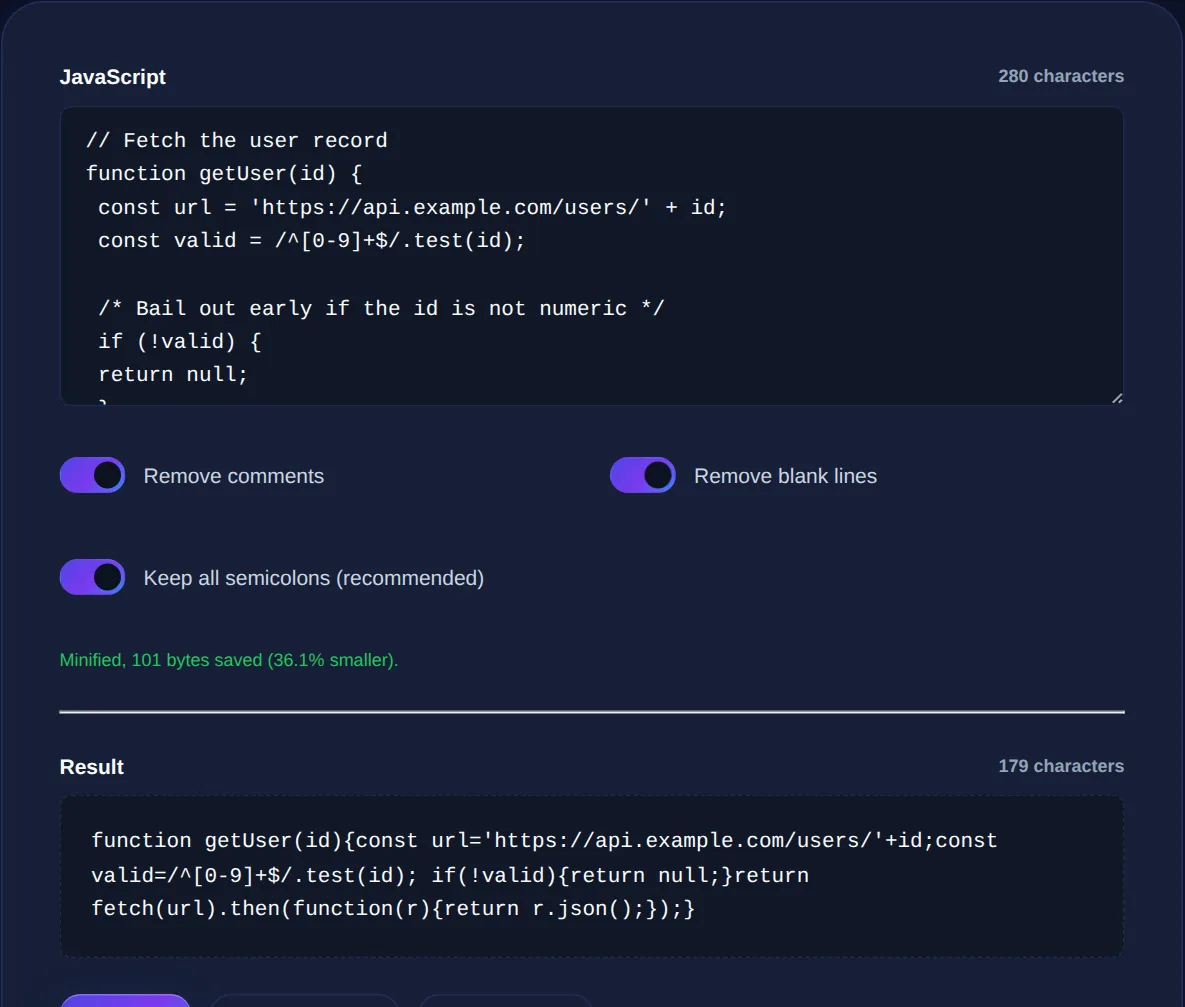
Minifying JavaScript means shrinking a script to the smallest form that still runs identically, so it downloads and parses faster. Like CSS minification it removes whitespace and comments, but JavaScript minifiers go further, they can also shorten internal variable and function names, which is why the savings are often larger. The JavaScript Minifier does this in your browser, and this article explains how it works, why it matters more for JavaScript than for other assets, and where it fits alongside modern build tools.
JavaScript is frequently the heaviest and most performance-critical asset a page loads, because the browser must not only download it but parse and execute it. Making it smaller helps on every one of those fronts.
What a JavaScript minifier does
Minification of JavaScript happens in layers, each removing more:
- Whitespace and comments are stripped, exactly as with CSS.
- Local variable and function names are shortened, a descriptive
calculateTotalPriceinside a function might becomea, since the name is irrelevant to how the code runs. - Redundant syntax is simplified where it does not change behaviour.
- Dead code may be removed by more advanced tools, a process called tree-shaking.
The name-shortening step is what sets JavaScript apart. Because internal names have no effect on behaviour, replacing long descriptive names with single letters can save a surprising amount on a large codebase, on top of the whitespace savings.
Why the savings matter more for JavaScript
A byte of JavaScript costs more than a byte of most other assets, because the browser does more with it. An image is downloaded and displayed; a script is downloaded, parsed, compiled and executed, and all of that happens on the main thread that also handles user interaction. Large scripts can therefore make a page feel sluggish even after it appears to have loaded. Minification reduces the download and, by shrinking the file, also reduces parse time. On mobile devices with slower processors and networks, this difference is especially noticeable.
Minification shortens names for size, which makes code hard to read, but it is not a security measure. Anyone can run minified code through a formatter to make it readable again. Never rely on minification to hide secrets or logic; treat all client-side code as public.
Minification versus bundling
In modern development, minification usually happens as one stage of a larger build. A bundler combines your many source files and their dependencies into one or a few files, resolving imports along the way; a minifier then shrinks the result. The two solve different problems, bundling reduces the number of requests and manages dependencies, minification reduces size, and they run in sequence. For a small project or a single script, a standalone minifier is all you need; for a large application, minification is a step inside your bundler's production build.
Keeping a readable source
The golden rule mirrors CSS: never edit minified JavaScript by hand. The shortened names and stripped formatting make it practically unreadable, and a single mistake is very hard to spot. You keep your readable, well-named source as the thing you develop and debug, and minify a copy for production. When you need to inspect a minified script, perhaps to understand a third-party library or debug a production issue, run it through a formatter first to restore readable structure, remembering that the original variable names are gone.
Shrink JavaScript by removing whitespace and shortening names, entirely in your browser. Your code is never uploaded.
Part of a complete optimisation
JavaScript minification is most effective as part of a full asset-optimisation pass. Minify your CSS and JavaScript, keep your HTML readable while you work and minified when you ship, and let your server apply gzip or Brotli compression on top. Together these routinely cut total page weight dramatically.
Source maps: debugging minified code
Minified JavaScript solves a performance problem but creates a debugging one: when an error occurs in production, the browser reports it in terms of the crushed, single-letter-variable code that no human can read, pointing at line one, column forty-thousand. The solution the industry settled on is the source map, a separate file that records how the minified code corresponds to your original source, so your browser's developer tools can translate a location in the minified file back to the exact line and variable name in the code you actually wrote.
With source maps in place, you get the best of both worlds: visitors download the small, fast minified file, while you debug against readable source as though no minification had happened. This is why modern build tools generate source maps automatically alongside the minified output. If you are minifying by hand for a small project you may not need them, but for any application where you will have to diagnose production errors, source maps turn minification from a debugging obstacle into a non-issue. The broader lesson is that minification is a production concern that should never compromise your ability to develop and debug, keep the readable source, generate source maps where you can, and treat the minified bundle purely as a delivery artefact.
For any script that ships to real users, minify it, the download and parse savings are real, especially on mobile, but pair it with source maps and a preserved source so you never trade away your ability to debug. Small in production, readable in development: that is the balance every good build strikes, and it is entirely achievable.
Bookmark a minifier for the quick jobs and lean on your build tool for the big ones, but always keep the readable source as your working copy. Ship small, develop readable, debug with source maps, get that balance right and heavy, script-driven pages feel noticeably faster to the people who use them.
To summarise: JavaScript minification shrinks scripts by removing whitespace and comments and by shortening internal names, and because scripts are parsed and executed rather than merely displayed, those savings improve real-world responsiveness, especially on mobile. Keep your readable source, minify for production as a build step, and never treat minification as security. It is one of the most reliable ways to make a modern, script-heavy page load and respond faster.