How to Convert JSON to CSV (and Why the Shape Changes)
Why JSON is a tree and CSV is a grid, how flattening nested objects into columns works, and the escaping rule that stops your export from breaking in a spreadsheet.
By Mubasher Hussain · Published 2026-09-10 · Updated 2026-09-01 · 1148 words · about 5 minute read
JSON is how programs exchange data; CSV is how spreadsheets read it. Converting between them is an everyday task, and it usually works fine until nested data or an awkward value quietly corrupts the file. The reason is that the two formats describe data in fundamentally different shapes, and a clean conversion means projecting one shape onto the other. This guide explains why the structure changes, how nested objects become columns, and the one escaping rule that separates a valid CSV from a broken one. You can convert and check any JSON with the free JSON to CSV tool.
A tree versus a grid
JSON is a tree. An object can contain other objects, arrays can hold objects, and the nesting can go as deep as you like, which is what makes it good for representing rich, structured data. CSV is the opposite: a flat grid of rows and columns with nothing deeper than a single cell. There is no nesting, no hierarchy, just a table. Converting from a tree to a grid therefore always involves a decision about how to flatten the tree so it fits into rows and columns without losing the parts you care about.
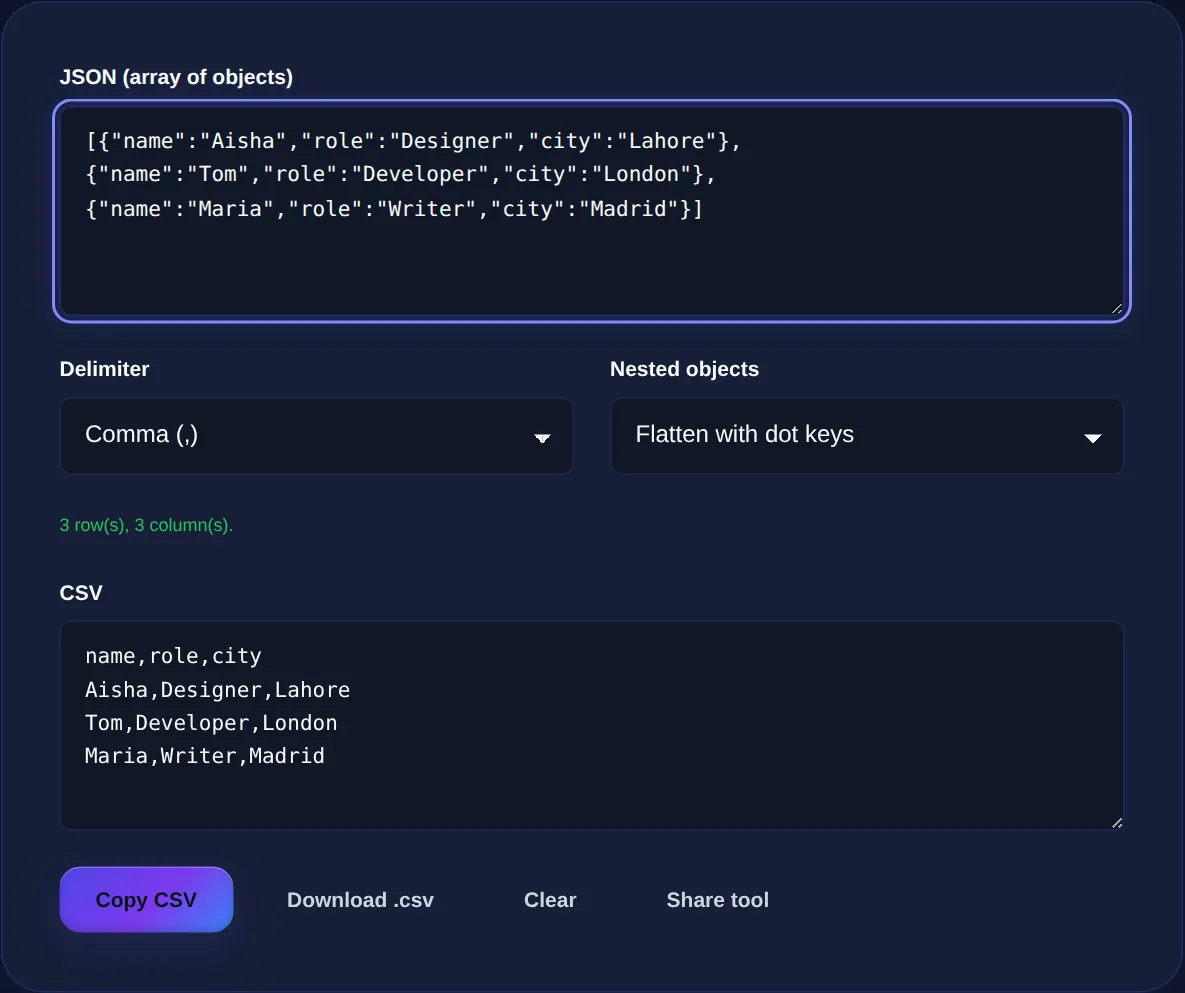
The natural unit for a CSV row is one record, and in JSON a record is an object. That is why a converter expects a top-level array of objects: each object in the array becomes one row, and the fields inside each object become the columns. If your JSON is a single object rather than an array, wrapping it in square brackets turns it into an array of one, which is all the converter needs.
Every key becomes a column
Real data is rarely uniform: some records carry fields that others do not. A good converter handles this by scanning every object first and collecting the full set of keys that appear anywhere, then using that set as the column headers. Records that lack a given field simply get an empty cell in that column, so everything still lines up. This is why the column order and count come from the data as a whole, not just the first record, which matters when the first object happens to be missing a field that later ones include.
| JSON records | name column | role column |
|---|---|---|
| {name: Ada, role: Engineer} | Ada | Engineer |
| {name: Alan} | Alan | (empty) |
| {name: Grace, role: Admiral} | Grace | Admiral |
Flattening nested objects
The interesting case is a value that is itself an object. Suppose each person has an address object with city and country inside it. A grid has no room for an object in a single cell in any useful way, so the standard solution is flattening: the nested keys are pulled up into top-level columns using dot notation. The city inside address becomes a column named address.city, and country becomes address.country. Nesting several levels deep just produces longer dotted names, so a value at contact.address.city lands in a column of that exact name.
Sometimes you would rather keep a nested value intact, for example when it is an array or an irregular structure that does not flatten cleanly. In that case the alternative is to serialise the value back to JSON text and drop it into a single cell, preserving it exactly even if it is not neatly tabular. Choosing between flattening and keeping-as-text is really a choice about whether you want to query those inner fields as columns later, or just carry them along.
Paste a JSON array of objects and get clean CSV instantly: flatten nested fields into dot-notation columns or keep them as JSON text, pick a delimiter, then copy or download.
The escaping rule that prevents broken files
This is the part that silently ruins exports. CSV separates fields with a delimiter, usually a comma, and rows with line breaks. So what happens when a value itself contains a comma, a line break, or a quotation mark? Without care, a description like Hello, world would look like two separate fields and shift every column after it out of alignment. The rule that fixes this is simple and universal: any field containing the delimiter, a double quote or a line break must be wrapped in double quotes, and any double quote inside such a field must be doubled.
So the value She said "hi" becomes "She said ""hi""" in the file: wrapped in quotes because it contains quotes, with each inner quote doubled so the reader knows it is literal. A spreadsheet then reads it back correctly as She said "hi". Getting this right by hand across hundreds of rows is tedious and error-prone, which is precisely why doing the conversion in a tool is worth it: the escaping is applied consistently to every cell.
In regions where the comma is the decimal separator, spreadsheets often expect a semicolon between fields instead. If your CSV opens as one long column, switch the delimiter to semicolon (or tab) and re-export, and it will split into columns correctly.
A quick worked example
Take two records: the first is name Ada, role Engineer with an address object holding city London; the second is name Alan, role Mathematician with city Cambridge. Flattened, the columns are name, role, address.city. The header row is name,role,address.city and the two data rows are Ada,Engineer,London and Alan,Mathematician,Cambridge. Add a value with a comma in it, say a role of Engineer, Lead, and that cell becomes "Engineer, Lead" so the extra comma cannot break the row. That is the entire conversion: rows from objects, columns from keys, dots for nesting, quotes for safety.
Common questions
What JSON shape does the converter expect? A top-level array of objects, where each object is one row. A single object works too if you wrap it in square brackets. How are arrays inside a record handled? Arrays do not flatten into neat columns, so they are kept as JSON text in one cell, which preserves them without misaligning the grid. Will it open correctly in Excel? Yes; if columns run together, change the delimiter to semicolon or tab to match your spreadsheet's locale. Is my data uploaded? No, the conversion runs entirely in your browser, so even JSON containing real credentials or customer data never leaves your device.
Converting JSON to CSV is less about a button and more about a shape change: a tree becomes a grid, nested keys become dotted columns, and careful escaping keeps the file intact. Keep the JSON to CSV tool open for your next export, tidy messy input first with the JSON Formatter, and when you need to go the other way, the CSV to JSON tool reverses the process.