Markdown Explained: Write Formatted Text Without a Word Processor
What Markdown is, the handful of symbols that do everything, and why it has become the default for developers and writers.
By Mubasher Hussain · Published 2026-07-26 · Updated 2026-09-01 · 1068 words · about 5 minute read
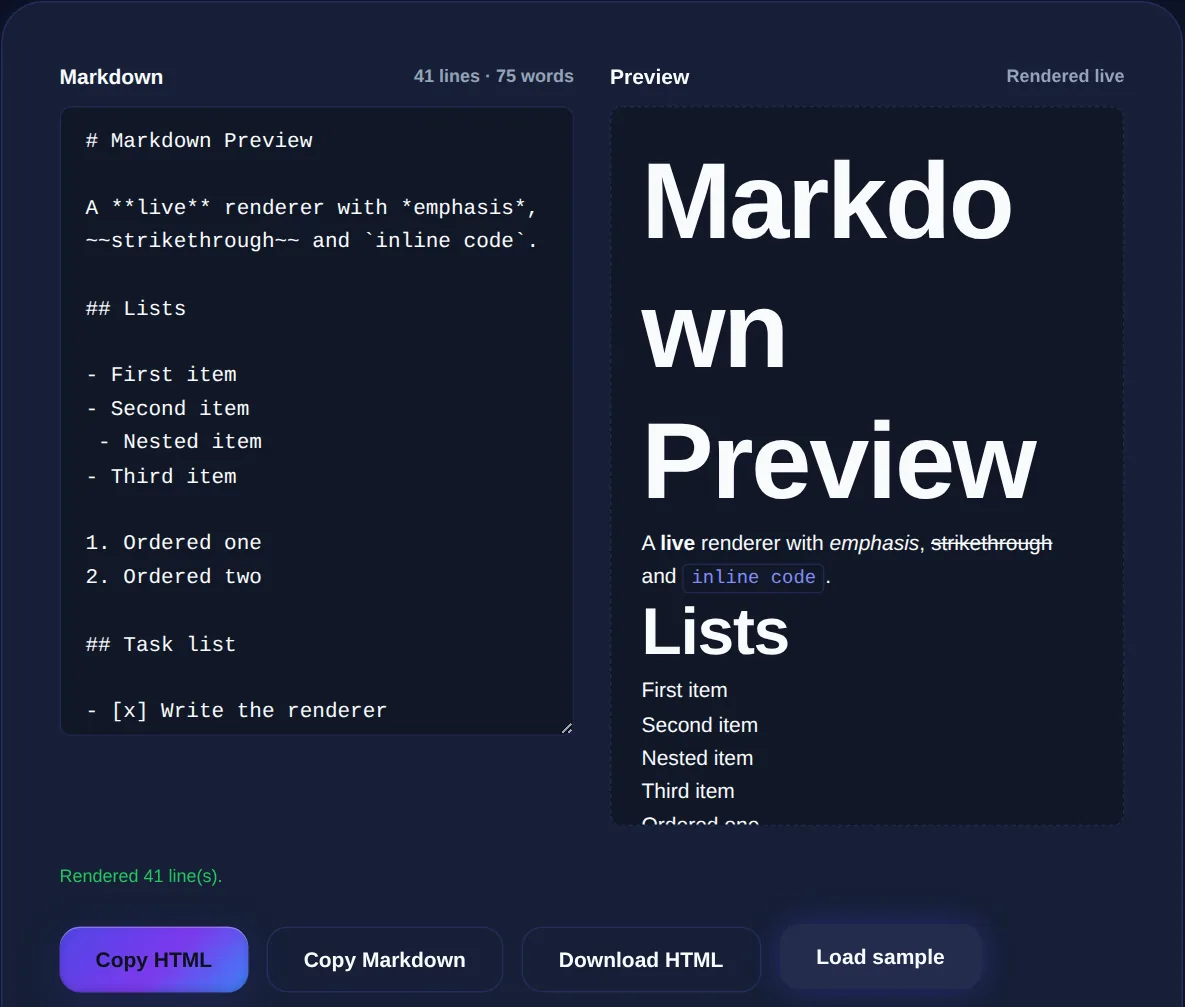
Markdown is a lightweight way to write formatted text using plain characters, so you can create headings, bold text, links and lists without a word processor or any HTML. You write **bold** and get bold; you write # Title and get a heading. It was designed to be readable as-is, even before it is converted, which is why it has become the default format for developer documentation, README files, notes apps and many writing tools. The Markdown Preview shows the formatted result live as you type, in your browser.
This article covers what Markdown is, the small set of symbols that does almost everything, and why so many people prefer writing in it over a traditional editor.
The idea behind Markdown
Markdown's founding principle is that the source should be readable even without being rendered. Where HTML wraps everything in tags, <strong>bold</strong>: Markdown uses light punctuation that mimics how people already emphasise text in plain writing, like putting asterisks around a word. This means a Markdown document is perfectly readable as plain text, and becomes formatted HTML when passed through a converter. You get the benefits of formatting without the visual clutter of markup while you write.
The core syntax
A handful of symbols covers the vast majority of everyday formatting:
- Headings: one to six
#characters at the start of a line set the heading level. - Emphasis:
*italic*or_italic_, and**bold**for strong emphasis. - Links:
[text](https://example.com). - Lists:
-or*for bullets, and1.for numbered lists. - Code: backticks for `inline code`, and triple backticks for a code block.
- Quotes: a
>at the start of a line.
That is enough to write almost any document. Everything else, images, tables, horizontal rules, follows the same spirit of simple, memorable punctuation.
The test of good Markdown is that it reads cleanly as plain text. If your source is cluttered and hard to follow, you are probably overusing formatting. The syntax is meant to stay out of the way of the words.
Why developers and writers prefer it
Markdown's popularity comes from a combination of practical advantages. Because it is plain text, it works in any editor, is easy to track in version control (you can see exactly what changed line by line), and will never be locked in a proprietary format. Because the syntax is minimal, you can format as you type without lifting your hands from the keyboard to click toolbar buttons. And because it converts cleanly to HTML, the same document can become a web page, a PDF or documentation without being rewritten. For anyone who writes a lot of structured text, developers especially, this frictionless, portable, future-proof quality is compelling.
Markdown to HTML and back
Markdown is almost always converted to HTML for display, and a live preview is the best way to write it, because you see the rendered result beside your source and catch formatting mistakes instantly. The conversion is well-defined, so the same Markdown produces the same HTML everywhere, though some tools support extra features like tables and task lists on top of the core syntax. If you need to see or clean up the generated HTML, an HTML formatter will lay it out readably.
Write Markdown and see the formatted HTML render live as you type, entirely in your browser. Your text is never uploaded.
Getting started
The best way to learn Markdown is to write it with a live preview open, so each symbol's effect is immediately visible. Start with headings and emphasis, add links and lists, and within a few minutes the syntax becomes second nature. Because you are writing plain text, you can also lean on writing tools alongside it, check length with a word counter and clarity with a readability checker, since Markdown never gets in the way of the underlying words.
Where you will encounter Markdown
Part of what makes learning Markdown worthwhile is how widely it is used, the same small syntax pays off across dozens of tools. It is the native format of README files and documentation on code-hosting platforms, where it renders automatically into formatted pages. It powers the comment and posting boxes of many developer communities and forums. A growing number of note-taking and writing apps use it as their underlying format, and static-site generators turn Markdown files directly into web pages. Learn it once and the skill transfers everywhere.
This ubiquity is not an accident; it flows from Markdown's plain-text nature. Because a Markdown document is just text, it works in any editor, survives being copied between apps, diffs cleanly in version control, and will still be readable decades from now regardless of what software exists then. Proprietary document formats offer none of these guarantees. For anyone who writes structured text regularly, documentation, notes, posts, articles, investing a few minutes in the core syntax returns a fast, portable, tool-agnostic way of writing that you will use for the rest of your career. Writing with a live preview at first makes the learning almost instant, and before long you will format text in Markdown without thinking about it, even in places that do not yet render it.
The best next step is simply to start writing in it. Open a live preview, jot a few notes using headings, bold, links and lists, and watch the formatting appear as you type. Within one short session the core symbols will feel natural, and you will have picked up a writing skill that works in more places than almost any other.
Once the syntax is second nature you will reach for it everywhere, from quick notes to full documentation, confident that your plain-text source will remain readable and portable no matter which tool opens it next. Few skills this small repay the effort so consistently across so many contexts.
In short, Markdown lets you write formatted text using simple, readable punctuation instead of tags or toolbars. Learn the handful of core symbols, write with a live preview until they are automatic, and you gain a fast, portable, version-control-friendly way to produce everything from quick notes to full documentation, all in plain text that stays readable whether or not it is ever rendered.